Skip to content
TurnIntoCMS

For Next.js sites

Your Next.js code is already a CMS.

Plug in the repo. No schema, no rebuild.

  1. Your code

    app/page.tsx

    export default function Home() {
      return (
        <section>
          <h1>Brand identity for independent shops</h1>
          <p>Booking new projects from March.</p>
          <img src="/work/harbor.jpg" alt="Harbor Coffee packaging" />
        </section>
      );
    }
  2. After your client clicks publish

    content: update 2 items

    • app/page.tsxBooking new projects from March.→Booking new projects from June.
    • app/page.tsxHarbor Coffee packaging→Harbor Coffee cups and bags
    • Edited by Maya Chen via TurnIntoCMS
Example, names are fictional.
  • No schema, no rebuild

  • Clients edit on the live site

  • Every edit is a Git commit

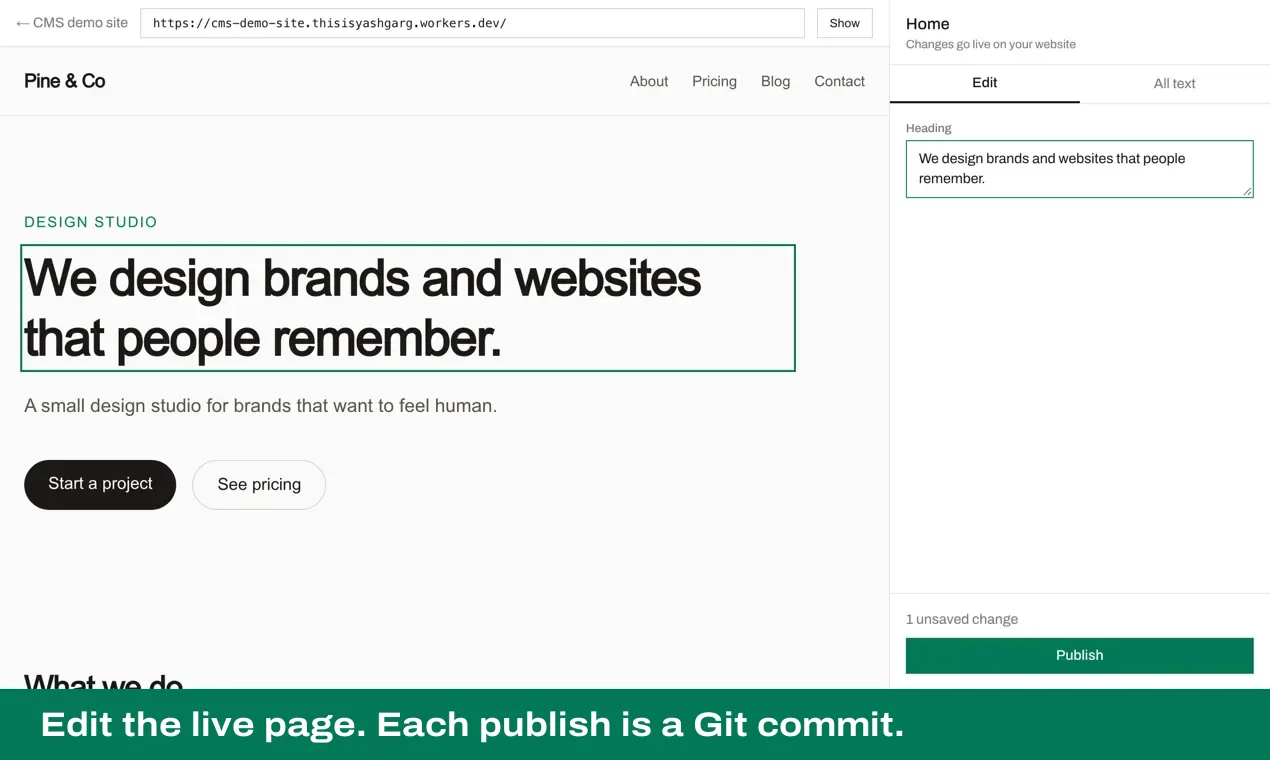
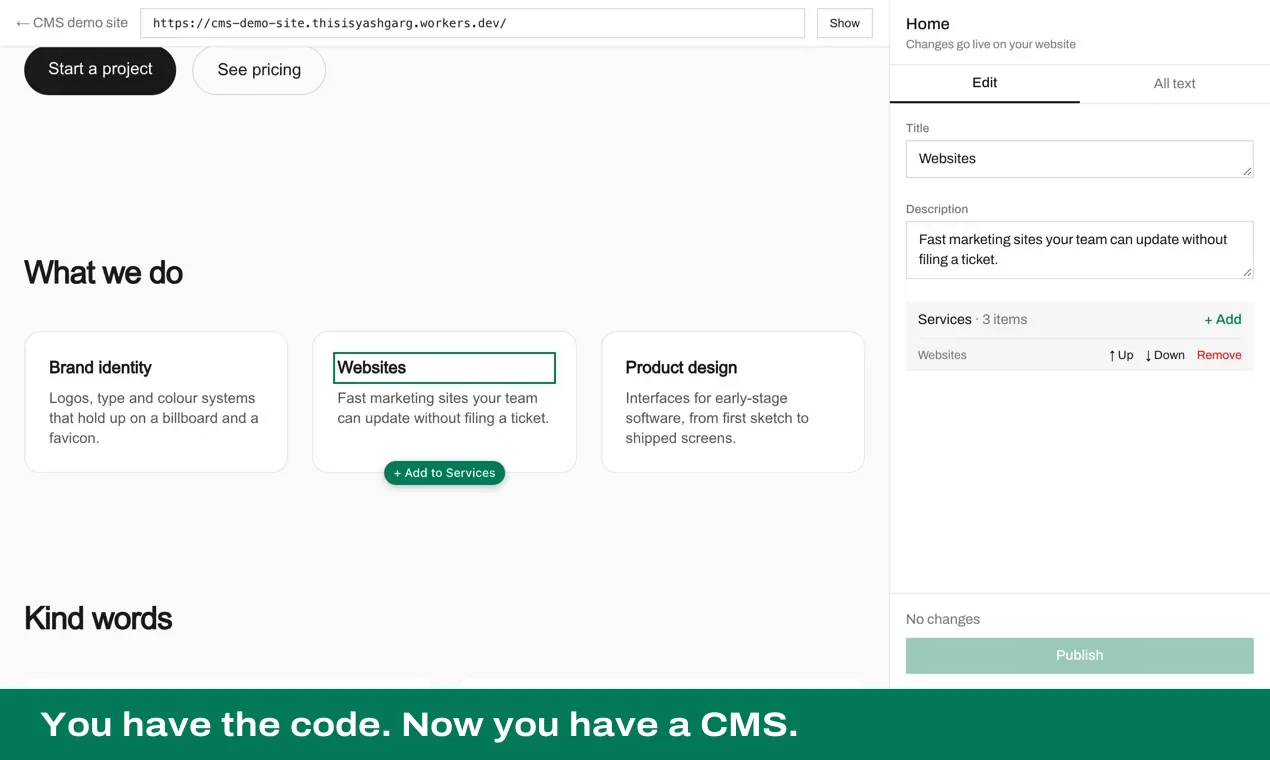
The real editor, not a mockup.

TurnIntoCMS editor with a heading selected on the live page and open as a text field beside it

Live in three steps.

  1. 1

    Plug in the repo

    Install the GitHub app on the repos you choose.

  2. 2

    Invite your client

    One email. No GitHub account needed.

  3. 3

    They edit and publish

    One commit, then your usual deploy.

Questions

Does it work with the App Router and the Pages Router?

Yes. TurnIntoCMS finds pages from app/**/page.tsx and from pages/*.tsx, then follows each page's layouts and local imports, up to 25 files per page.

Do I have to restructure my components?

No. TurnIntoCMS edits strings where they already are: JSX text, attributes such as alt and title, image src, href, and strings in TypeScript, JavaScript or JSON files the page imports. Moving long lists into a data file can make them easier to manage, but it isn't required.

How does my client see the site while editing?

The editor loads your deployed site from its public address, taken from the website field on the GitHub repo or one you enter. Next.js pages show their server-rendered HTML, which already holds the content.

Can the client break the build?

They can only change string values, and TurnIntoCMS writes each value in the right form for where it sits: JSX text, a quoted attribute or a template literal. If a change still needs undoing, it is one commit you can revert.

Does TurnIntoCMS deploy the site?

No. TurnIntoCMS commits to GitHub. The host you already use, such as Vercel, Netlify or Cloudflare, builds and deploys from that commit.

The details

Why not add a headless CMS?

The usual answers to "can my client edit this?" are another CMS platform or a headless CMS. A CMS platform means rebuilding your React code as a theme, a monthly plan for the site, and someone who knows the platform. With a headless CMS you define a schema for every section, rewrite components to fetch from an API, wire up a preview mode, and from then on the content lives in one system and the code in another. That is worth it for a newsroom. For a ten page studio site with a hero, a services list and a contact block, it is days of work the client never sees, plus a second service you now keep running.

TurnIntoCMS skips both. You already have the code, so it becomes the CMS. TurnIntoCMS reads each page from your repository the way you wrote it: JSX text, image tags, links, and the arrays and objects in the data files the page imports. Each one becomes a field the client can change on the live site. When they publish, TurnIntoCMS writes the new value back at the same spot in the file and commits it to the branch you picked. Your host builds from that commit, the same as when you push.

What TurnIntoCMS reads in a Next.js repo

App Router pages are found from app/**/page.tsx, with route groups like (marketing) left out of the URL. Pages Router pages come from pages/*.tsx, skipping api routes and files that start with an underscore. For each page TurnIntoCMS also opens its layouts (or pages/_app) and follows local imports, including @/ and ~/ aliases, up to 25 files. A hero in components/hero.tsx or a services array in lib/content.ts shows up as editable too.

Class names, ids, slugs, variants and other props that look like code are left alone. Text that comes from somewhere else at runtime, such as a database or an API response, isn't in the repo, so TurnIntoCMS can't edit it. Prices are editable when they are written as text, like "$49".

What stays in your control

The client edits content, not structure. They can't add components, change class names or touch logic. Every publish is one commit whose message lists each change, old value and new, and the name of the person who made it, so git log, blame and revert work as always.

If a file changed on GitHub after the client opened the page, publishing stops instead of overwriting your work, and asks them to refresh first.

Related reading

Turn your Next.js repo into a CMS.

One website free. Then $1 each, paid once.